BMBY Logo
蓝山·必赢 BMBY
員工報銷系統
Employee Reimbursement
BY Logo

報銷申請 使用教程

Reimbursement Guide

按照以下步驟提交報銷申請,財務審核後以 USDT (BEP-20) 打款

Follow these steps to submit your expense claim. Finance will review and pay in USDT (BEP-20).

蓝山·必赢(BMBY)報銷系統用於統一處理員工和合作伙伴的市場費用報銷。填表 + 上傳憑證後,管理員審核,財務以 USDT (BSC / BEP-20) 打款至您的 BNB 鏈地址。

The BMBY Reimbursement System handles expense claims from employees and partners. Submit the form with evidence, admins review it, and finance pays out in USDT (BSC / BEP-20) to your BNB address.

📝
填表提交
Submit Form
Admin 審核
Admin Review
💰
USDT 打款
USDT Payment
1
進入報銷提交頁
Open the Submission Page

在瀏覽器打開以下鏈接:

Open the following link in your browser:

https://bmby-reimburse-web-production.up.railway.app

建議收藏此鏈接,方便下次使用。

Bookmark this link for future use.

報銷申請頁面 hero banner
報銷申請頁面頂部Reimbursement submission page
2
提交前:在頻道發帖(辦公室/活動類必須)
Before Submitting: Post to Channel (Office / Event Claims)
⚠ 辦公室房租、裝修/物業、活動接待等類別,必須先在頻道發圖/視頻
⚠ Office rent, renovation, and event categories must first post evidence to the channel
  1. 點擊鏈接加入頻道:t.me/BetwinBlueMount
  2. 點擊進入「市場」話題:t.me/BetwinBlueMount/7124,在該話題下發送現場圖片或視頻
  3. 發送後,長按帖子 → 「複製鏈接」,得到格式如 https://t.me/BetwinBlueMount/7124/12345 的鏈接
  4. 將此鏈接填入表單對應欄位
  1. Join the channel: t.me/BetwinBlueMount
  2. Open the "Market" topic: t.me/BetwinBlueMount/7124, then post your photos or videos
  3. After posting, long-press → "Copy Link". You'll get a link like https://t.me/BetwinBlueMount/7124/12345
  4. Paste this link into the corresponding field on the form
3
填寫報銷表單
Fill in the Form
姓名 / 暱稱 必填
Name Required
填寫您的真實姓名或常用暱稱,最多 100 字。 Your real name or common nickname. Max 100 characters.
聯繫方式 必填
Contact Required
微信號、手機號或 Telegram 用戶名。例:wx12345 / +8613800000000 / @username WeChat ID, phone, or Telegram username. E.g. wx12345 / +8613800000000 / @username
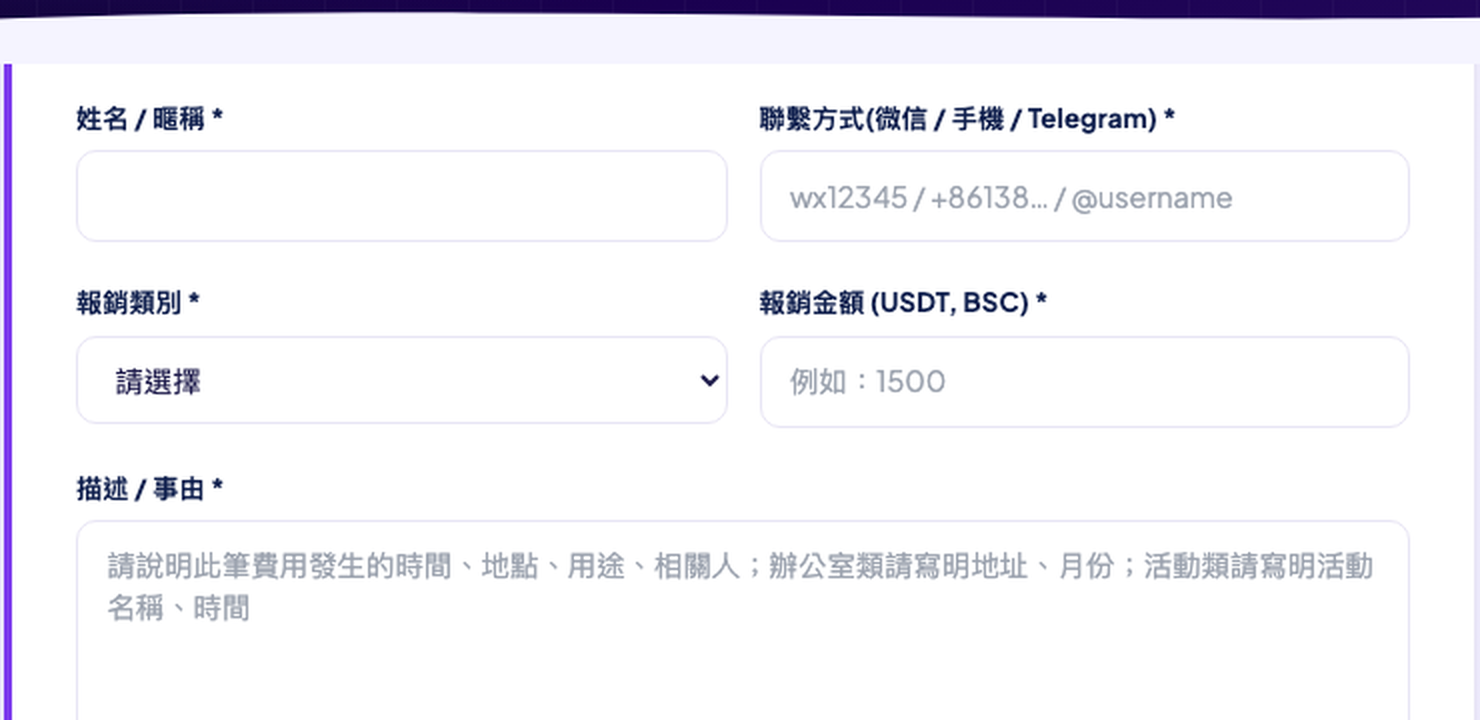
表單欄位 — 姓名、聯繫、類別、金額
表單欄位示例(姓名、聯繫方式、類別、金額、描述)Form fields — name, contact, category, amount and description
報銷類別 必填
Category Required
辦公室房租
月租、年租費用
辦公室裝修/物業
裝修、水電、物業費
營銷物料
印刷品、橫幅、禮品
活動接待
場地、餐飲、接待費
設備採購
電腦、相機等設備
差旅
交通、住宿
講師費用
外聘講師、培訓師酬勞
其他
不屬於以上類別
Office Rent
Monthly or annual rent
Office Setup
Renovation, utilities, property mgmt
Marketing Material
Printing, banners, gifts
Event / Hospitality
Venue, catering, hosting fees
Equipment
Computers, cameras, devices
Travel
Transportation, accommodation
Lecturer Fee
External lecturer remuneration
Other
Does not fit above categories
金額 (USDT) 必填
Amount (USDT) Required
以 USDT 計價(BSC BEP-20),最高 1,000,000。如費用為人民幣,請換算後填寫。 In USDT (BSC BEP-20). Max 1,000,000. Convert from other currencies before entering.
描述 / 事由 必填
Description Required

詳細說明(5–2000 字),需包含:

  • 發生時間(年月日)
  • 發生地點(城市/地址)
  • 用途(具體做什麼)
  • 辦公室類:請寫明地址和月份
  • 活動類:請寫明活動名稱和時間

Detail the expense (5–2000 chars), including:

  • Date of the expense
  • Location (city / address)
  • Purpose (what was purchased)
  • Office claims: include address & rental month
  • Event claims: include event name & date
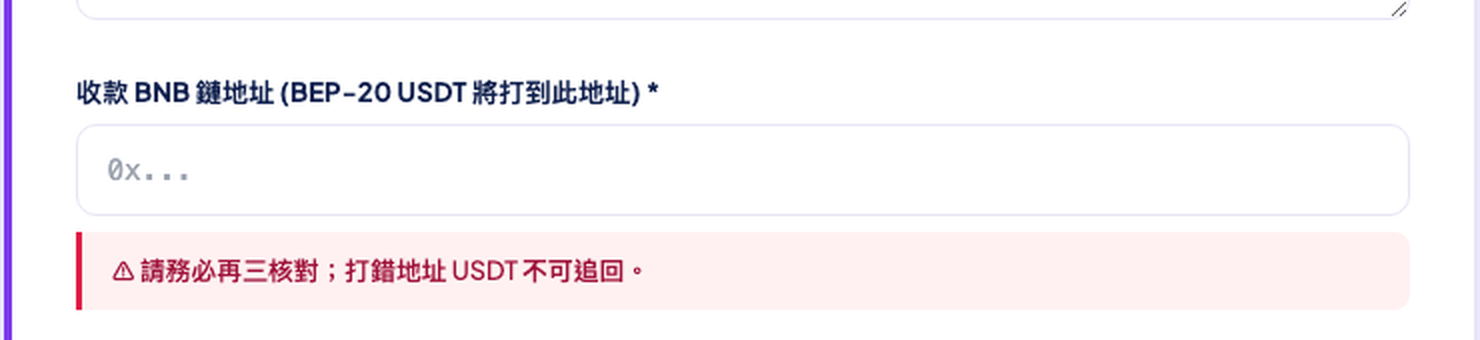
BNB 鏈地址 ⚠ 必填
BNB Address ⚠ Required

您的 BNB 鏈(BSC)錢包地址,USDT (BEP-20) 將打款至此。

Your BNB Chain (BSC) wallet address where USDT (BEP-20) will be sent.

⚠ 地址填錯後 USDT 無法追回!請至少核對三遍。格式:0x 開頭,共 42 位字符。
⚠ Wrong address = USDT cannot be recovered! Triple-check before submitting. Format: starts with 0x, 42 characters total.
BNB 地址欄位與紅色警告
BNB 收款地址欄位及紅色警告提示BNB address field with critical warning
頻道帖子鏈接 必填
Channel Post Link Required

貼入第 2 步中從 @BetwinBlueMount 複製的帖子鏈接。

Paste the channel post link you copied in Step 2 from @BetwinBlueMount.

格式示例 / Format: https://t.me/BetwinBlueMount/7124/12345

頻道帖子鏈接欄位
頻道帖子鏈接欄位(市場話題鏈接格式)Channel post link field with format example
上傳憑證 必填
Upload Evidence Required
  • 圖片:最多 10 張,每張 ≤ 10 MB,JPG / PNG / WebP / HEIC
  • 視頻:最多 1 個,≤ 50 MB,MP4 / MOV / WebM
  • Photos: up to 10 images, each ≤ 10 MB — JPG / PNG / WebP / HEIC
  • Video: up to 1 video, ≤ 50 MB — MP4 / MOV / WebM

上傳憑證與提交按鈕
上傳憑證欄位與「提交審核」按鈕Upload field and "Submit for Review" button
4
點擊「提交審核」
Click "Submit for Review"

填完所有欄位後,點擊頁面底部藍色「提交審核」按鈕。

After filling all fields, click the blue "Submit for Review" button.

✅ 提交成功後,頁面將顯示您的報銷編號(UUID),請截圖保存。如有問題請提供此編號聯繫客服。

✅ On success, the page shows your reimbursement ID (UUID). Take a screenshot. Provide this ID when contacting support.

5
後續流程
What Happens Next
1
Admin 審核
Admin Review
4 位管理員將審核您的申請,確認憑證和金額的合理性。通常在 1–3 個工作日內完成。
4 admins review your claim and verify evidence. Usually completed within 1–3 business days.
2
批准 → 安排打款
Approved → Payment
審核通過後,財務將手動轉帳 USDT (BEP-20) 至您的 BNB 鏈地址並記錄交易 Hash。
Finance manually transfers USDT (BEP-20) to your BNB address and records the transaction hash.
如被拒絕
If Rejected
管理員將填寫拒絕原因。如有疑問請聯繫官方客服說明情況後重新提交。
The admin provides a rejection reason. Contact official support to clarify and resubmit.
⚠️
必做:聯繫官方客服確認報銷資訊
Required: Contact Official Customer Service
提交表單後,還必須通過 Telegram 聯繫客服提供以下資料
After submitting the form, contact support via Telegram with the following
  • 您的姓名
  • 收款 BNB 鏈地址(請再次核對)
  • 報銷憑證(發票、收據截圖等)
  • 報銷編號(提交成功後頁面顯示的 UUID)
  • Your name
  • BNB chain address (double-check before sending)
  • Reimbursement evidence (receipts, invoice screenshots)
  • Reimbursement ID (the UUID shown after form submission)

⚠ 請務必通過以上官方帳號聯繫,謹防冒充客服的詐騙帳號。

⚠ Only contact the official accounts listed above. Beware of impersonators.

⚠ 注意事項

⚠ Important Notes

🔴
BNB 地址務必三次核對。地址錯誤導致的 USDT 損失,本系統無法追回,概不負責。 Triple-check your BNB address. USDT sent to a wrong address cannot be recovered.
🟡
同一筆費用只報銷一次。系統會自動標記同一地址近 30 天的重複申請供 admin 參考。 Each expense may only be claimed once. The system flags repeat submissions within 30 days.
🔵
視頻大小限制 50 MB。超出大小請壓縮後上傳,或改用 Telegram 頻道帖子的方式提供。 Video size limit is 50 MB. Please compress large videos before uploading.
🟢
頻道帖子鏈接必須來自 @BetwinBlueMount其他頻道的帖子鏈接系統無法驗證。 Channel post links must be from @BetwinBlueMount. Links from other channels cannot be verified.