蓝山·必赢 BMBY
報銷申請教程
Reimbursement Submission Guide

📋 什麼是報銷系統?

蓝山·必赢(BMBY)運營報銷系統用於統一處理員工和合作伙伴的市場費用報銷申請。您只需在線填表並上傳憑證,管理員將審核後以 USDT (BSC / BEP-20) 方式打款至您的 BNB 鏈地址。

📝
填表提交
Admin 審核
💰
USDT 打款

📋 What is This System?

The BMBY Reimbursement System provides a unified process for employees and partners to submit expense claims. Simply fill out the online form and upload your receipts. Once approved, finance will transfer USDT (BSC / BEP-20) to your BNB chain address.

📝
Submit Form
Admin Review
💰
USDT Payment
1

進入報銷提交頁

Open the Submission Page

在瀏覽器打開以下鏈接:

https://bmby-reimburse-web-production.up.railway.app

建議保存此鏈接或加入書籤,方便下次使用。

Open the following link in your browser:

https://bmby-reimburse-web-production.up.railway.app

Bookmark this link for future use.

2

提交前:在頻道發帖(辦公室/活動類必須)

Before Submitting: Post to the Channel (Required for Office/Event Claims)

⚠ 重要:辦公室房租、裝修/物業、活動接待等類別,必須先在頻道發圖/視頻

  1. 點擊鏈接加入頻道:t.me/BetwinBlueMount
  2. 點擊進入「市場」話題:t.me/BetwinBlueMount/7124,在該話題下發送現場圖片或視頻(可多張)
  3. 發送後,長按帖子 → 「複製鏈接」,得到格式如 https://t.me/BetwinBlueMount/7124/12345 的鏈接
  4. 將此鏈接填入表單對應欄位

⚠ Important: For office rent, renovation, or event claims, you must first post evidence to the channel

  1. Join the channel: t.me/BetwinBlueMount
  2. Open the "Market" topic: t.me/BetwinBlueMount/7124, then post your photos or videos there
  3. After posting, long-press the message → "Copy Link". You'll get a link like https://t.me/BetwinBlueMount/7124/12345
  4. Paste this link into the corresponding field on the form
3

填寫報銷表單

Fill in the Form

姓名 / 暱稱 必填
Name Required
填寫您的真實姓名或常用暱稱,最多 100 字。
Enter your real name or common nickname. Max 100 characters.
聯繫方式 必填
Contact Required
填寫微信號、手機號或 Telegram 用戶名,方便財務聯繫確認。例:wx12345 / +8613800000000 / @username
Your WeChat ID, phone number, or Telegram username, so finance can contact you. E.g. wx12345 / +8613800000000 / @username
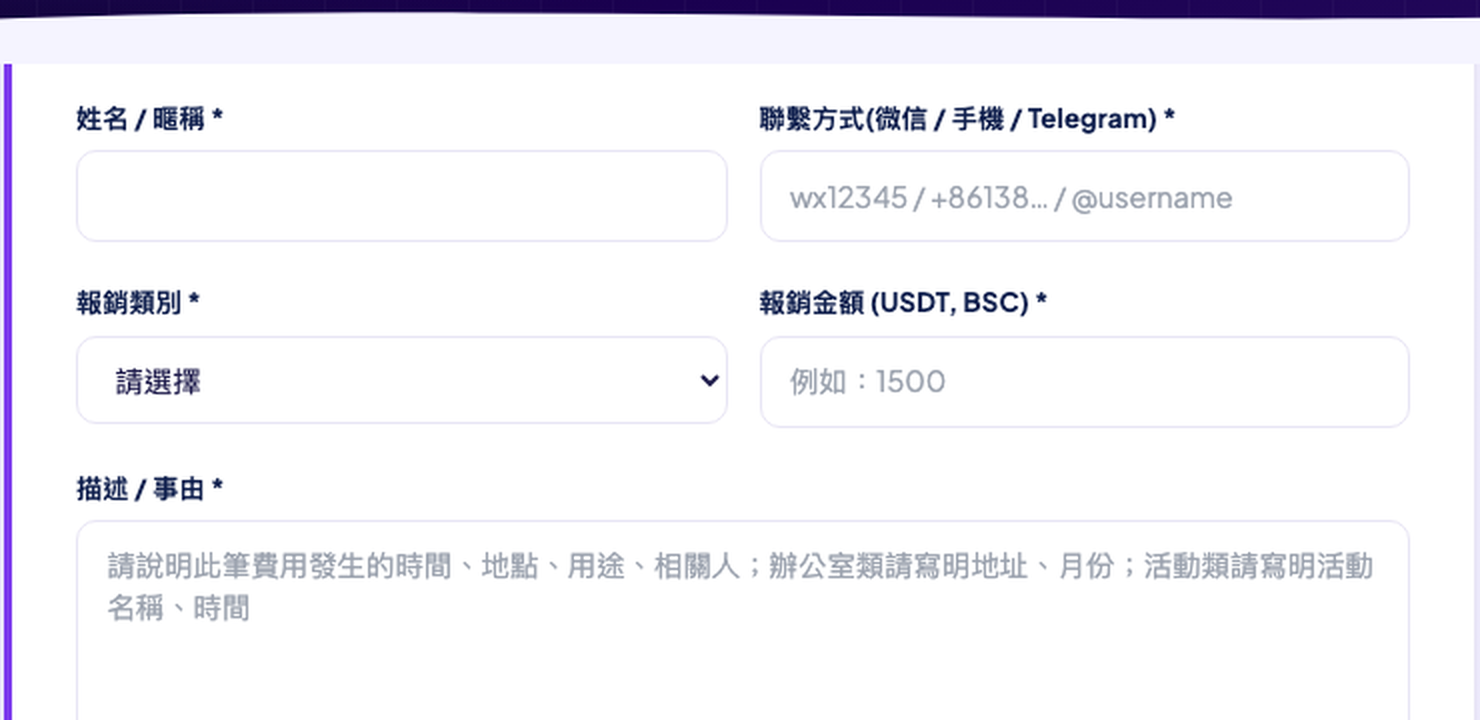
報銷類別 必填
Category Required
從下拉選單選擇最符合的類別:
辦公室房租 — 月租、年租費用
辦公室裝修/物業 — 裝修、水電、物業管理費
營銷物料 — 印刷品、橫幅、禮品等
活動接待 — 活動場地、餐飲、接待費
設備採購 — 電腦、相機等設備
差旅 — 交通、住宿
其他 — 不屬於以上類別
Select the most appropriate category from the dropdown:
Office Rent — Monthly or annual rent
Office Setup — Renovation, utilities, property management
Marketing Material — Printing, banners, promotional gifts
Event/Hospitality — Venue, catering, hosting fees
Equipment — Computers, cameras, devices
Travel — Transportation, accommodation
Other — Does not fit above categories
金額 (USDT) 必填
Amount (USDT) Required
以 USDT 計價填寫報銷金額(BSC 鏈 BEP-20 USDT),最小 0.000001,最大 1,000,000。如原始費用為人民幣,請換算為 USDT 後填寫。
Enter the reimbursement amount in USDT (BSC BEP-20). Min: 0.000001, Max: 1,000,000. If the original expense is in CNY or other currency, convert to USDT before entering.
描述 / 事由 必填
Description Required

詳細說明費用情況(5–2000 字),應包含:

  • 發生時間(年月日)
  • 發生地點(城市/地址)
  • 用途(具體做什麼)
  • 相關人員(如適用)
  • 辦公室類:請寫明地址和月份
  • 活動類:請寫明活動名稱和時間

Describe the expense in detail (5–2000 characters), including:

  • Date of the expense
  • Location (city/address)
  • Purpose (what exactly was purchased/paid for)
  • Participants (if applicable)
  • Office claims: include the address and rental month
  • Event claims: include the event name and date
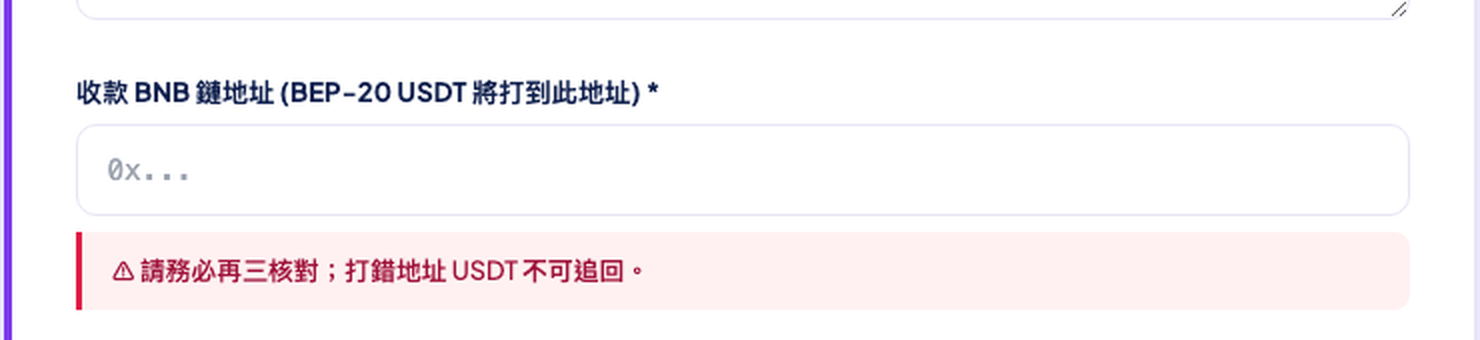
BNB 鏈地址 必填
BNB Address Required

填寫您的 BNB 鏈(BSC)錢包地址,USDT (BEP-20) 將打款至此地址。

⚠ 極其重要 地址填錯後,USDT 無法追回!請至少核對三遍。格式:0x 開頭,共 42 位字符。

Enter your BNB Chain (BSC) wallet address. USDT (BEP-20) will be sent here.

⚠ Critical An incorrect address means your USDT cannot be recovered! Triple-check before submitting. Format: starts with 0x, 42 characters total.
頻道帖子鏈接 必填
Channel Post Link Required

貼入第 2 步中從 @BetwinBlueMount 頻道複製的帖子鏈接。

格式示例:https://t.me/BetwinBlueMount/7124/12345

Paste the channel post link you copied in Step 2 from @BetwinBlueMount.

Format example: https://t.me/BetwinBlueMount/7124/12345

上傳憑證 必填
Upload Evidence Required

上傳費用憑證(發票、收據、現場照片/視頻):

  • 圖片:最多 10 張,每張 ≤ 10 MB,支援 JPG / PNG / WebP / HEIC
  • 視頻:最多 1 個,≤ 50 MB,支援 MP4 / MOV / WebM

Upload expense evidence (receipts, invoices, on-site photos/videos):

  • Photos: up to 10 images, each ≤ 10 MB, JPG / PNG / WebP / HEIC
  • Video: up to 1 video, ≤ 50 MB, MP4 / MOV / WebM
4

點擊「提交審核」

Click "Submit for Review"

填完所有欄位後,點擊頁面底部藍色「提交審核」按鈕。

✅ 提交成功後,頁面將顯示您的報銷編號(UUID),請截圖保存。如有任何問題,請提供此編號聯繫管理員。

After filling all fields, click the blue "Submit for Review" button at the bottom of the form.

✅ On success, the page will display your reimbursement ID (UUID). Take a screenshot. If you have questions later, provide this ID to the admin.

5

後續流程

What Happens Next

1
Admin 審核
Admin Review
4 位管理員將審核您的申請,確認憑證和金額的合理性。通常在 1–3 個工作日內完成。
4 admins will review your claim, verify evidence and amounts. Usually completed within 1–3 business days.
2
批准 → 安排打款
Approved → Payment Arranged
審核通過後,財務將手動轉帳 USDT (BEP-20) 至您填寫的 BNB 鏈地址,並記錄交易 Hash。
Once approved, finance will manually transfer USDT (BEP-20) to your BNB address and record the transaction hash.
如被拒絕
If Rejected
管理員將填寫拒絕原因,如有疑問請聯繫相關管理員說明情況後重新提交。
The admin will provide a rejection reason. If you disagree, contact the admin to clarify and resubmit.

⚠ 注意事項

⚠ Important Notes

© 2026 蓝山·必赢 (BMBY) — 蓝山基金會 · 如有問題請聯繫您的管理員
© 2026 Bluemount · BMBY — Bluemount Foundation · For questions, contact your admin